> For the complete documentation index, see [llms.txt](https://docs.akiraghost.com/llms.txt). Markdown versions of documentation pages are available by appending `.md` to page URLs; this page is available as [Markdown](https://docs.akiraghost.com/dashboard/dashboard/profile-and-account.md).

# Profile & Account

The **Profile** page is where you manage who you are on Akira: your picture, password, linked Discord, and the licenses on your account. A few related settings live on the **Settings** page, noted below.

## Profile picture

Your avatar shows on your profile and in our software. To change it, click your avatar (or the **Edit** button) on the profile header and pick an image — PNG or JPEG. It updates as soon as the upload finishes.

{% hint style="warning" %}
Our system uses AI image detection to block offensive, hateful, NSFW, gore, or otherwise illegal content. Our child-protection feature is active and reports illegal activity to the appropriate authorities, which may result in account termination.
{% endhint %}

## Your identity

The Identity card shows your **username** and account number, plus your **email**. Your email is blurred by default — click the eye icon to reveal it. Username and email are shown for reference here and aren't edited from this card.

## Change your password

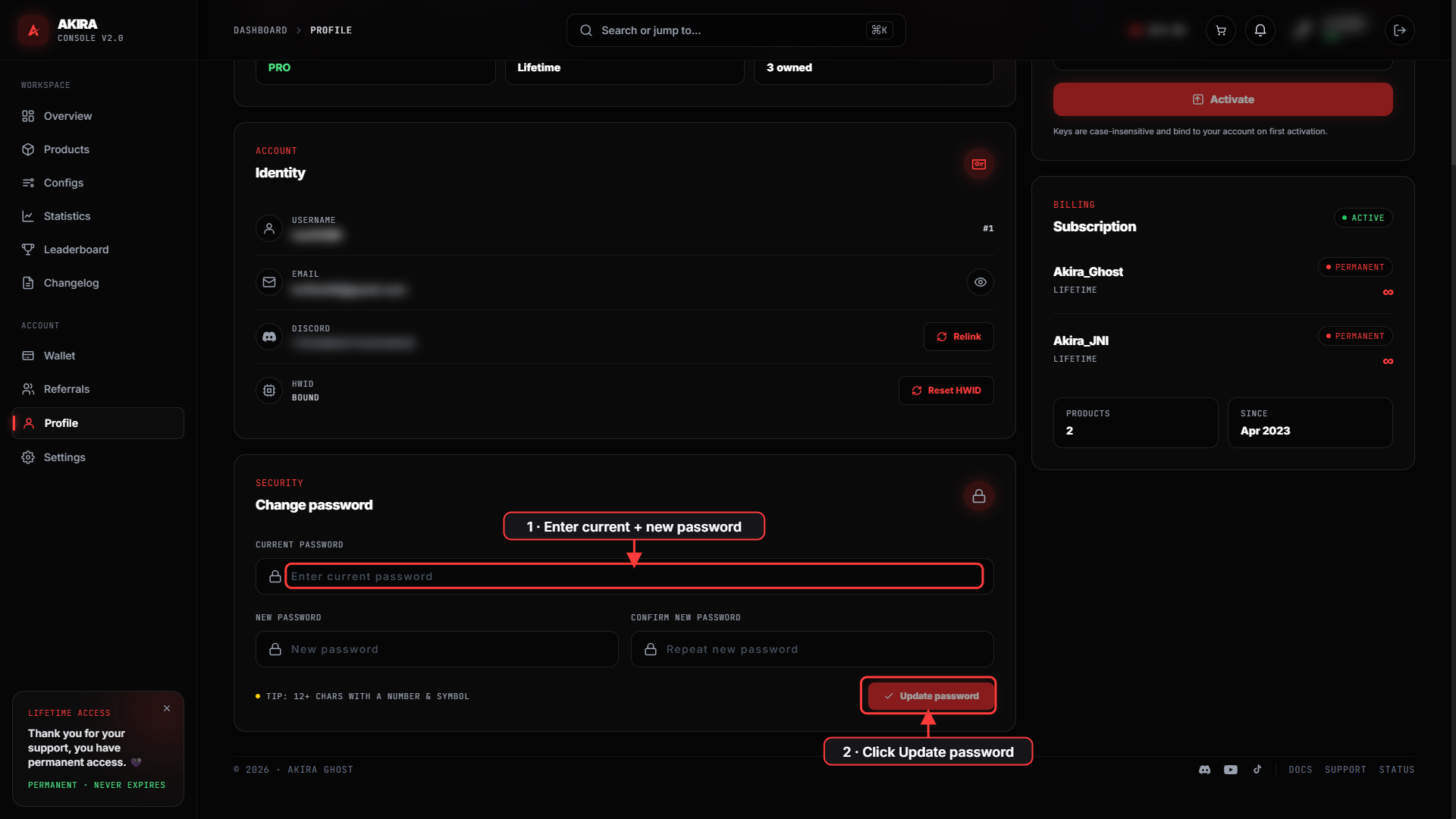
The **Change password** section asks for three things:

{% stepper %}
{% step %}

### Enter your current password

This confirms it's really you.
{% endstep %}

{% step %}

### Choose a new password

As you type, a strength meter shows how strong it is. Aim for **12+ characters with a number and a symbol**. It can't match your current password.
{% endstep %}

{% step %}

### Confirm and update

Repeat the new password — you'll see a match indicator — then click **Update password**. You'll get a confirmation when it's saved.
{% endstep %}
{% endstepper %}

<figure><img src="/files/nVvsFXjx7djiLQJ6Fe11" alt="The Change password section with current and new password fields and the Update password button"><figcaption><p>Enter your current password, choose a new one, then click <strong>Update password</strong>.</p></figcaption></figure>

## Activate a license key

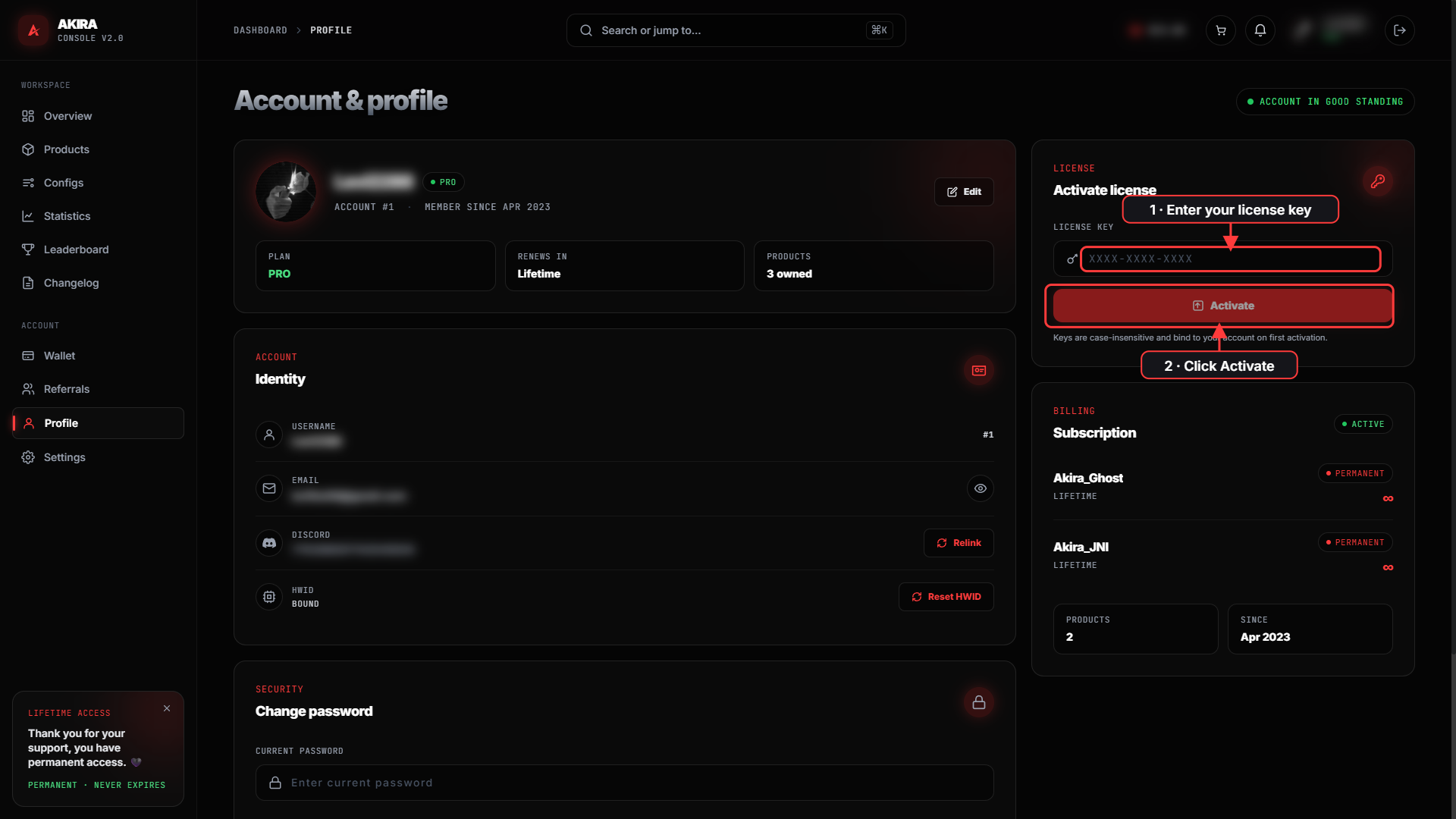
Got a key from a giveaway or an authorized reseller? Use the **Activate license** box.

* Keys look like `XXXX-XXXX-XXXX` and are **case-insensitive**.
* A key **binds to your account** the first time you activate it.
* Click **Activate** and you'll get a confirmation.

<figure><img src="/files/95h6KcMmPADJ5KOGj9Em" alt="The Activate license box on the Profile page with a key field and Activate button"><figcaption><p>Enter your <code>XXXX-XXXX-XXXX</code> key in the <strong>Activate license</strong> box and click <strong>Activate</strong>.</p></figcaption></figure>

For the full walkthrough and troubleshooting, see [Using Subscription Keys](/faq/payments-and-related/using-subscription-keys.md).

## Link your Discord

Connecting Discord gives you the @customer role in our server. In the Identity card (or under **Settings → Connected accounts**), click **Connect Discord** and authorize the Akira app. If you're already linked, the button reads **Relink**. More on the perks in [Customization & Account Linking](/faq/general-questions/user-account/customization-and-account-linking.md).

<figure><img src="/files/iTzespJXaF40vePwGysF" alt="The Identity card showing the Discord Relink button and the Reset HWID button"><figcaption><p>The Identity card holds your <strong>Discord</strong> link and the <strong>Reset HWID</strong> control.</p></figcaption></figure>

## Email preferences

Under **Settings**, the newsletter section has a master subscription toggle. With it on, you can pick which emails you want — **Changelog updates** and **News & announcements** — and each choice saves on the spot.

## Your subscriptions

The billing summary lists the products on your account, with each one's days remaining or a **Permanent** badge for lifetime licenses, and the date you joined Akira.

{% hint style="info" %}
Looking to reset your HWID, review active sessions, or sign out? Those are on the [Security & Sessions](/dashboard/dashboard/security-and-sessions.md) page.
{% endhint %}